
Every time a system in your CUI environment changes: a new application installed; a firewall rule modified; a server patched; a user account provisioned… your compliance posture potentially changes with it. Configuration Management is the discipline that ensures those changes are controlled, documented, tested, and reviewed before they introduce new vulnerabilities or create gaps between your documented SSP and your actual environment.
This nugget clarifies what Configuration Management actually means in the CMMC context, maps the specific controls assessors evaluate, and walks through the most common failures organizations encounter in this domain.
The Configuration Management (CM) Control Family
CMMC Level 2 contains nine CM controls. Unlike most control families, they build on each other so organizations should look at this as a program of nine elements rather than independent controls.
CM.L2-3.4.1: Establish and maintain baseline configurations and inventories
This is the foundational CM control. Before you can control changes, you must document what your systems look like in their approved, secure state. Your baseline must include:
- Hardware inventory: all devices within the assessment scope
- Software inventory: all applications, versions, and authorized use cases
- Firmware inventory: network devices, servers, and endpoints
- Network topology: documentation showing how systems connect and communicate
- Security configuration settings for each system type
Assessor Reality Check: No baseline = immediate CM.L2-3.4.1 finding, regardless of how well your systems are actually configured. The baseline must be formally documented and approved, not just “known to your IT team”.
CM.L2-3.4.2: Establish and enforce security configuration settings
Once your baseline exists, you must define the specific security settings that apply to each system type and enforce them consistently. Common implementation approaches include:
- Security benchmarks such as CIS (Center for Internet Security) benchmarks applied to operating systems, applications, and network devices
- Group Policy Objects (GPOs) enforcing security settings across Windows environments
- Mobile Device Management (MDM) enforcing settings on endpoints and mobile devices
- Automated configuration compliance scanning to detect deviation from approved settings
CM.L2-3.4.3: Track, review, approve, and log changes to baseline configurations
This is the core Change Management control. Every change to a system within your CUI environment must go through a documented process:
- Request: a change is proposed with documented justification
- Security impact analysis: the security implications are formally evaluated before approval (see CM.L2-3.4.4 below)
- Approval: an authorized individual or change control board approves the change
- Implementation: the change is made within the approved scope
- Logging: the change is recorded with timestamps, approver, implementer, and description
- Verification: the change is confirmed to have been implemented as approved
Assessor Reality Check: Assessors will request your change log and pull specific changes to verify the full process was followed. A log of changes with no approval records or no security impact analysis entries will not satisfy this control.
CM.L2-3.4.4: Analyze the security impact of changes prior to implementation
This is the most commonly missed CM control. Organizations frequently document that changes were tested functionally (confirming the change works as intended) but have no record of a separate security impact analysis evaluating what the change does to their security posture.
A security impact analysis must address:
- Does this change affect any security controls currently documented in the SSP?
- Does this change introduce new attack surface, open new ports, or modify access controls?
- Does this change require the SSP to be updated?
- What is the risk if this change is implemented incorrectly?
This analysis must be documented before implementation, not reconstructed after the fact.
CM.L2-3.4.5: Define, document, approve, and enforce physical and logical access restrictions associated with changes
Not everyone should be able to make changes to systems within your CUI environment. This control requires:
- A defined and documented list of who is authorized to make configuration changes
- Separation between those who request changes and those who approve them (connecting to AC.L2-3.1.4 from Nugget #6)
- Technical enforcement where possible (change management tool permissions, privileged access controls, etc)
- Audit trail showing who made which changes
CM.L2-3.4.6: Employ the principle of least functionality
Systems within your CUI environment should be configured to provide only the capabilities required for their intended purpose and nothing more. This means:
- Disable or remove unnecessary operating system features and components
- Remove applications not required for business operations
- Disable unnecessary services, daemons, and background processes
- Apply this principle at initial deployment and verify it is maintained over time
CM.L2-3.4.7: Restrict, disable, or prevent the use of nonessential programs, functions, ports, protocols, and services
Where CM.L2-3.4.6 addresses the system level, 3.4.7 specifically targets programs, ports, protocols, and services. Common implementations:
- Host-based firewall rules blocking unnecessary ports
- Application control policies preventing unauthorized software execution
- Disabling legacy protocols that are no longer required (Telnet, FTP, SMBv1, etc.)
- Regular review of open ports and running services against the approved baseline
CM.L2-3.4.8: Application Execution Policy: Apply permit-all, deny-by-exception (blacklisting) policy to prevent the use of unauthorized software OR deny-all, permit-by-exception (whitelisting) policy to allow the execution of authorized software.
This is one of the most challenging CM controls to implement operationally. A deny-all, permit by-exception policy (sometimes referred to as application whitelisting) means that only explicitly approved software is permitted to execute. Everything else is blocked by default. The opposite is true for a blacklisting policy wherein everything is permitted except specific unapproved software. While both approaches are allowable under Rev 2, whitelisting is easier to manage and maintain over the long run.
Implementation options include:
- Windows Defender Application Control (WDAC)
- AppLocker
- Third-party application control platforms
Assessor Reality Check: Many organizations have an acceptable use policy that prohibits unauthorized software. The policy is not the same as the technical implementation. Assessors are looking for the technical enforcement mechanism and the policy.
CM.L2-3.4.9: Control and monitor user-installed software
Even with application whitelisting in place, users may attempt to install unauthorized software. This control requires that organizations have:
- A documented policy on user-installed software
- Technical controls preventing standard users from installing software without administrator approval
- Monitoring and alerting for software installation events
- Regular software inventory reviews to detect unauthorized installations
Common Configuration Management Hiccups
With the control framework established, here are the most common failures assessors encounter — now mapped to specific controls:
Hiccup 1: No Documented Baseline (CM.L2-3.4.1)
The most fundamental failure. Organizations know what their systems look like but have never formally documented it. Without a baseline, every other CM control is impossible to assess objectively.
Hiccup 2: Change Process Exists but Isn’t Followed (CM.L2-3.4.3)
Many organizations have a change management policy but make emergency or informal changes outside the process. Every undocumented change is a finding and assessors can discover them by comparing the change log to the actual system state.
Hiccup 3: Security Impact Analysis Missing (CM.L2-3.4.4)
The most commonly missed assessment objective in the CM family. Functional testing records exist but no security impact analysis. Add a dedicated security impact analysis step with its own documentation field to your change management process.
Hiccup 4: Configuration Drift (CM.L2-3.4.1, CM.L2-3.4.2)
Systems that were properly configured at deployment but have gradually drifted from the approved baseline. Without automated compliance scanning, drift goes undetected until assessment. Implement regular configuration compliance scans and act on deviations.
Hiccup 5: Deny-by-Exception Is Policy, Not Technical Control (CM.L2-3.4.8)
The requirements of objective [a] states that you have the whitelisting or blacklisting policy and objective [c] states that you have implemented the technical means to meet the policy requirement. They go hand-in-hand to satisfy CM.L2-3.4.8. A written policy prohibiting unauthorized software does not alone satisfy the control. A technical enforcement mechanism that blocks unauthorized software from executing is also required. Assessors will test whether unauthorized software can actually run, not just whether a policy exists that prohibits it.
Hiccup 6: SSP Not Updated After Changes (CA.L2-3.12.4)
Configuration changes that affect implemented controls must trigger an SSP update. Organizations frequently make approved changes through their change management process but never update their SSP to reflect the new state. Build SSP review into the post-implementation verification step of your change process.
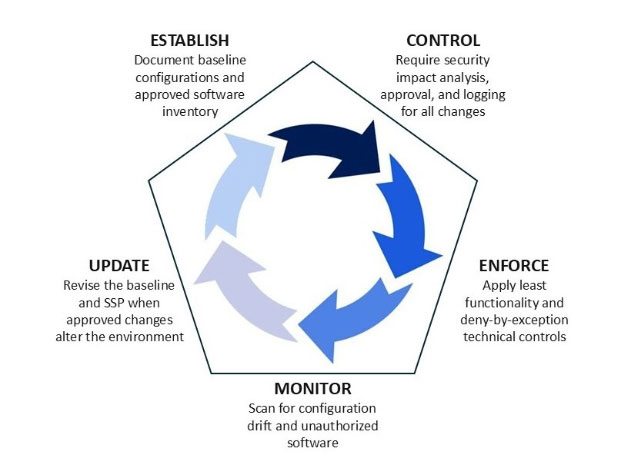
The Configuration Management Lifecycle
Effective CM is not a one-time setup but rather a continuous cycle.
SSP Mapping Note
All nine CM controls must be documented under the Configuration Management section of your SSP. The baseline configuration itself (along with your change management process documentation, change logs, and software inventory) are the primary evidence artifacts assessors request in this domain. Your change log is a living document that assessors will pull specific entries from to verify your process is being followed, not just documented.
For assistance establishing a compliant configuration management program, developing your baseline documentation, or preparing CM evidence for assessment, contact DTC’s C3PAO team.